
Warming up the Algorithm: How to Get More Engagement on Instagram
By Lauralyn Brown | June 30, 2026
The Instagram algorithm is this ever-elusive thing. Just when you think you’ve nailed it down, more updates come along that make you feel like a victim of bullying. Before 2016, Instagram was a simple platform that let you post those cute photos of your dog or a flower you picked on your walk and displayed them to your followers in chronological order. Now, 10 years later, the algorithm has evolved into a recommendation ranking system that leaves users with the same question every month— how to get more engagement on Instagram.
Today, the Instagram algorithm ranks content based on your individual preferences as a way to keep you on the platform longer (cheeky!). The content that you like, comment on, and share with other people alerts the algorithm to show you more of that content.
So, instead of walking into Instagram, posting your latest photo, and walking away hoping that it’ll get shown to thousands of people, there are a couple of tips and tricks I’ve learned from my experience as a content creator that will help you, what I like to call, “warm up the algorithm” and increase your overall reach on Instagram.

Simple Ways to Get More Engagement on Instagram
Try these simple hacks for yourself and watch your Instagram engagement start to grow!
Prioritize original content
The first (and probably most important) tip when warming up the Instagram algorithm is to always prioritize original content. Sure, hopping on popular trends is a quick way to get more engagement on Instagram, but it doesn’t always convert into an active and engaged community. The algorithm rewards original ideas and creativity in any format and recommends them to more people over trends or reshares.
Engage with your niche 20 minutes before posting
Time to warm things up! Before you plan to post, spend about 20 minutes engaging with your niche. Like, leave comments, share, repost, reply to stories, and respond to DMs during this time to alert the Instagram algorithm that you are active. This also helps the algorithm better categorize your content and recommend it to other active users within your niche community. I tried this for a few weeks on my travel digital creator account, and the results were incredible.
Respond to comments and DMs 10-15 minutes after posting
Now that the algorithm is warm and ready to categorize your content, it’s time to keep your post hot. After posting, hang out for the first 10-15 minutes; DO NOT post and ghost. Respond to incoming comments and DMs to keep the conversation going. This lets the algorithm know that your post is getting active attention and should be boosted to more people.
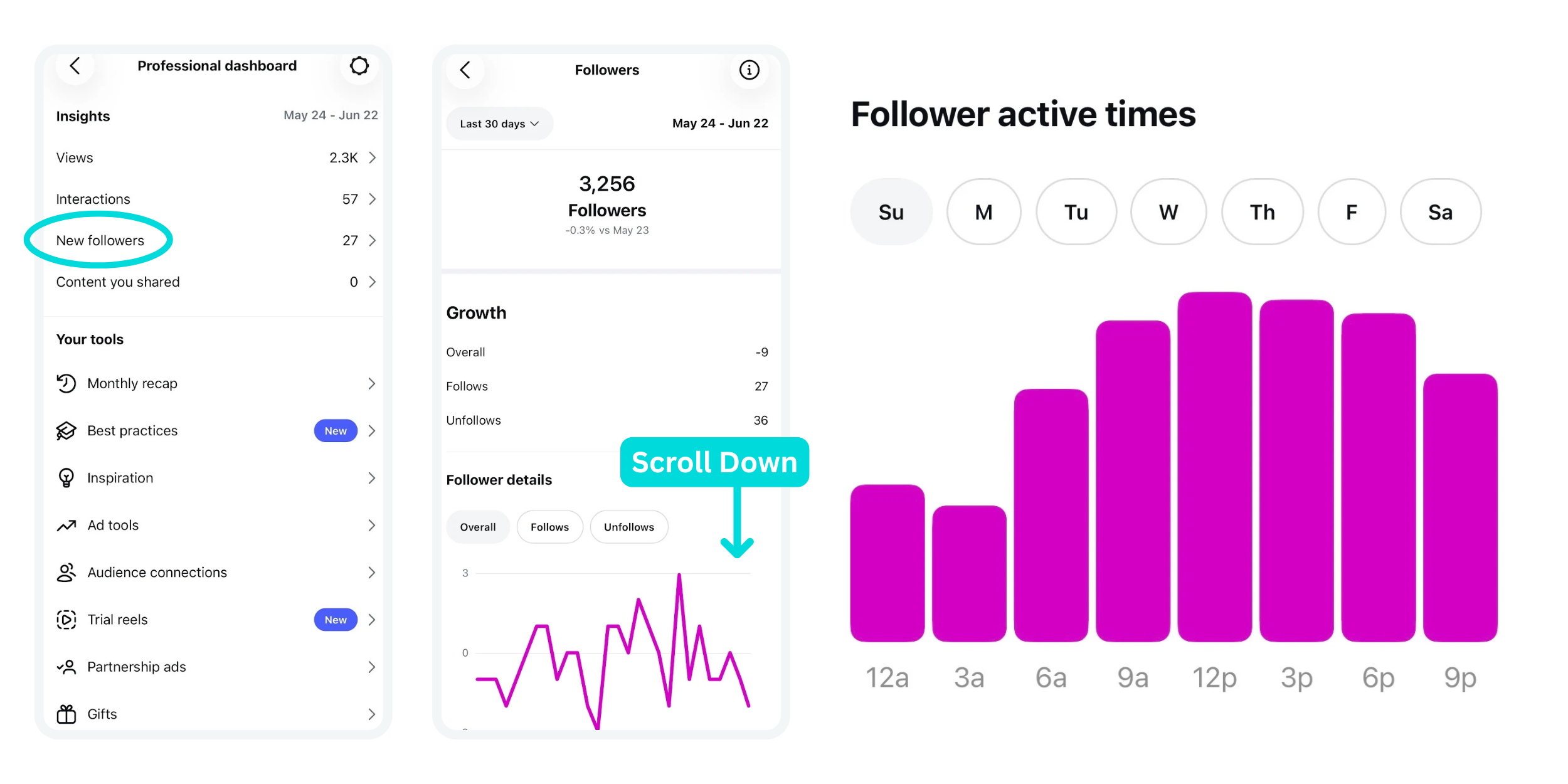
Post when ‘Follower Active Times’ is highest
This is an underrated tip that I have personally used for the last three years, and it’s not talked about enough.
GO TO:
Professional Dashboard > New Followers
Scroll down to the very bottom to Follower Active Times
You’ll find a graph with the times of day when your followers are the most active. If you want to get more engagement on Instagram, start by posting at the most active time of day for your followers. This will help your posts gain that initial momentum in engagement.
Use the Repost feature
There are two different ways to strategically use Instagram’s Repost feature to boost your Instagram engagement. First, reposting your post about two to three hours after initially publishing can help boost your reach. Second, if you have older evergreen posts (two to four months old) on your Instagram feed, reposting them can help you gain fresh eyes on your content and reach new followers.
Replace hashtags with keywords
Hashtags are no longer the primary way that the algorithm categorizes your content (R.I.P. hashtags). You can absolutely still use hashtags on Instagram, but because Instagram is now considered a search engine, the algorithm can easily categorize your content based on SEO keywords that are included in your posts. A simple trick I like to use is including a block of keywords hidden in my reels or at the end of a caption where the block of hashtags used to go. For example, if I were posting a reel about a day in my life as a military spouse living overseas, I would add niche-related keywords and hide them off-screen.
Hit Aa Text
Type your keywords, e.g., day in the life, military spouse, military overseas, life in Europe, milspouse living overseas, etc.
Make your text really small by pinching your fingers together on the screen and drag your block of text off-screen until it’s no longer visible.
When adding keywords, think of common phrases and words that your audience is most likely to search on Instagram, and make sure your post can easily answer those questions and is searchable.
Between constant platform updates and new features being introduced, learning how to get more engagement on Instagram can feel confusing. To be honest, we may have to come back next year and update this blog post with new findings! But the most important thing to remember is that every niche community on Instagram is unique in its own way, and consistency is the key to longevity. In the long run, more or fewer views don’t really matter. What matters is the community that you build online and how you foster it. If you’re posting consistently and engaging with your community, you’re already doing all the right things.
If you’re reading this and you’re thinking, “This seems like a lot of work that I don’t have time for,” that’s great! We can handle it for you!
As a full-service digital marketing agency, we take social media completely off your plate (yes, literally everything).

LAURALYN BROWN
Lauralyn is a Content Creator and Coordinator at AMR Digital. She has a background in English and Writing and loves to geek out about SEO and Reel ideas. Outside of the office, Lauralyn is a military spouse, an obsessive dog mom, and most likely planning 3 trip itineraries at once.